Starter checklist
Are you starting a new job and do not have a form P45? Do you need to tell your new employer about your student loan position? We set out more information about how to complete a starter checklist, including annotated examples.

Content on this page:
Introduction
You may find it useful to read this page in conjunction with our guidance on changing jobs/work changes and starting work as an employee.
Employers use an employee’s tax code to work out how much tax-free allowances they are allowed each pay period so that they can then calculate tax on the rest.
If you are starting a new job and do not have a form P45 from a previous employer or the Department for Work and Pensions, your employer should ask you to complete a starter checklist.
This allows your employer to work out what tax code to use in the first instance. This will be confirmed or, more rarely, changed, by HMRC in due course, once HMRC have had a chance to consider your circumstances.
If you do not provide the information asked for in the starter checklist, you could end up paying the wrong amount of tax.
If your employer does not ask you to complete a starter checklist, you can find the form on GOV.UK and complete it yourself (you can even do this ‘late’ – find out more on GOV.UK).
Give the completed checklist to your employer. Do not send the checklist to HMRC. We also recommend keeping a copy of the checklist for your records.
Choosing the correct statement
One major cause of tax problems for those in employment is the incorrect completion of the starter checklist – in particular, picking the wrong employee statement (A, B or C).
On a starter checklist, an employee is asked which statement applies to them:
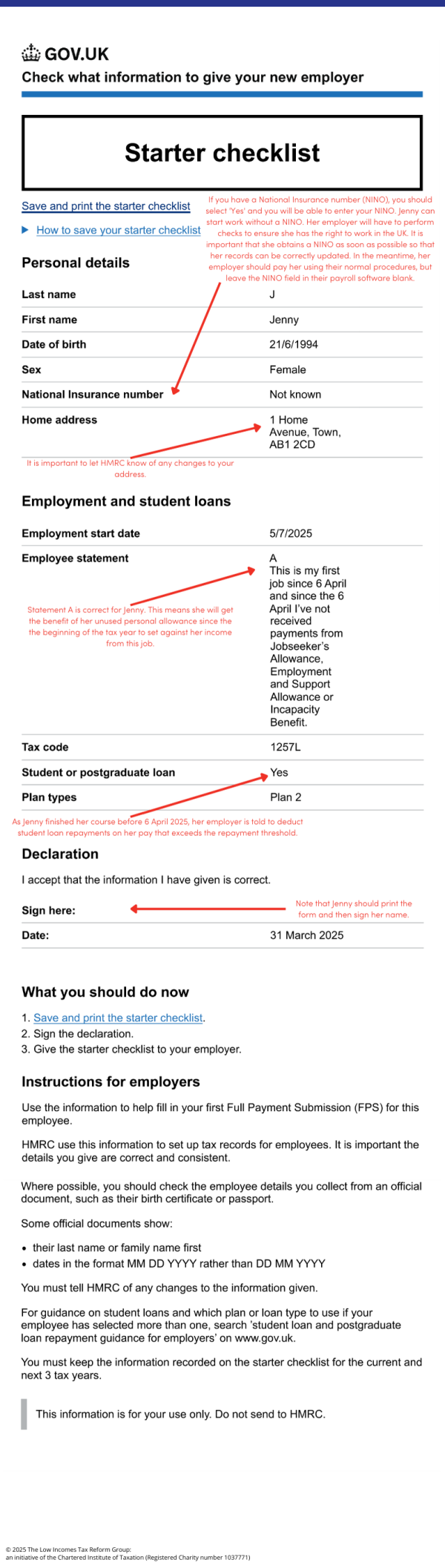
- Statement A: This is their first job since last 6 April and they have not been receiving taxable jobseeker's allowance, employment and support allowance, taxable incapacity benefit, state pension or occupational pension.
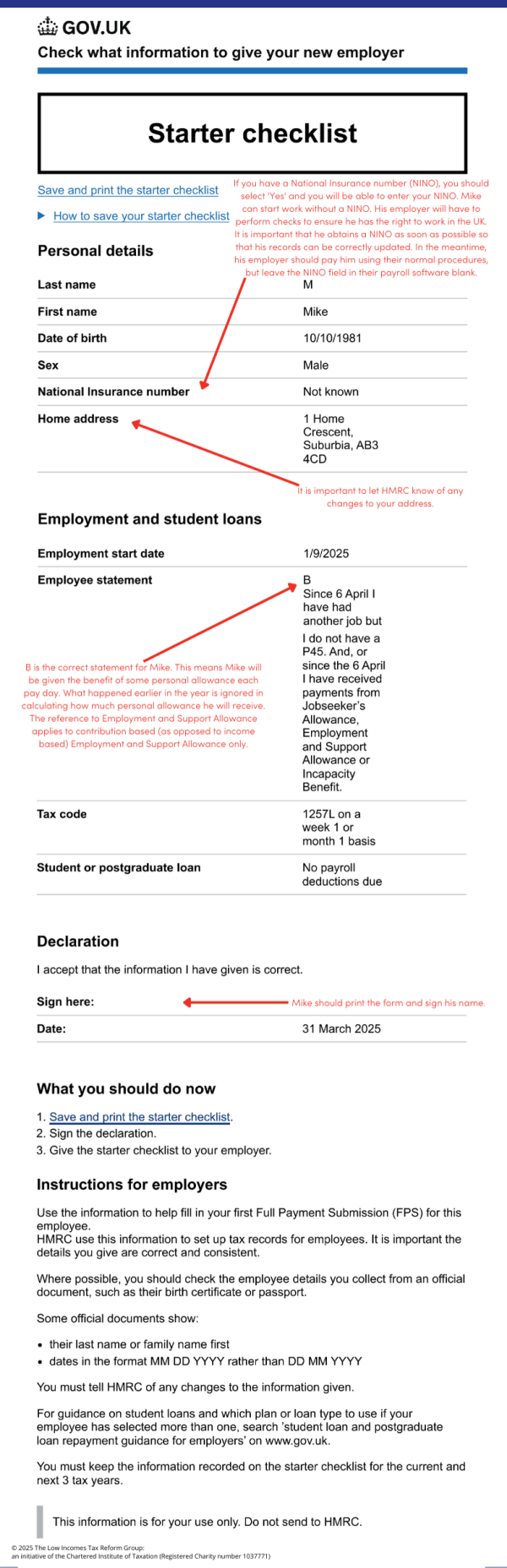
- Statement B: This is now their only job, but since last 6 April they have had another job, or have received taxable jobseeker's allowance, employment and support allowance or taxable incapacity benefit. They do not receive state or occupational pension.
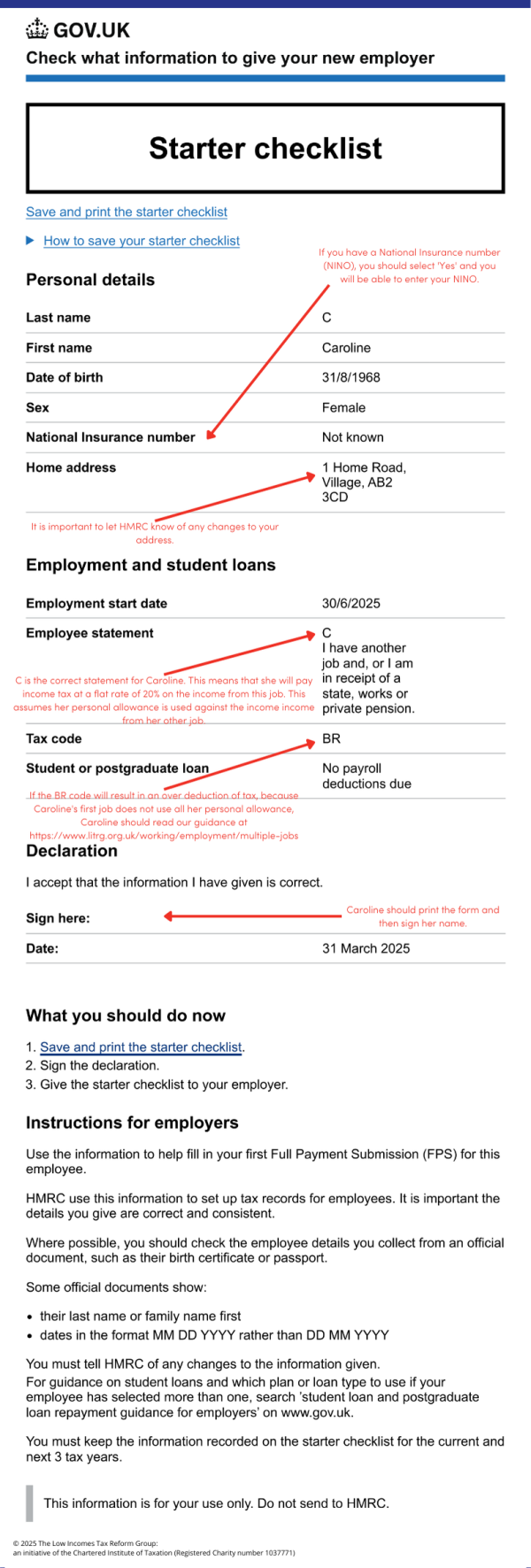
- Statement C: They have another job or receive a state or occupational pension.
Depending on what statement you pick, your employer will allocate you a tax code and work out the tax due on your first payday.
If you do not pick a statement or do not complete the starter checklist at all, then your employer will use a tax code 0T. For a basic rate taxpayer, this will produce the same result as a BR code (that is, a flat rate 20% deduction).
It is very important that you keep a copy of the starter checklist that you complete or at least make a note of the statement that you select and keep it somewhere safe, as you may need to refer to it if ever there is a problem.
- Statement A
-
Selecting statement A will result in the tax code 1257L in 2026/27.
This gives you the full benefit of your personal allowance since the beginning of the tax year, sometimes described as a cumulative tax code.
So, for example, if you have not worked since the beginning of the tax year and get a job on 1 September 2026, and you tick statement A, you will be allowed £6,288 of tax-free allowance (six months x £1,048 (1/12 x 12,570) = £6,288) to use against that month’s wages (and to carry forward). By the 12th month of the tax year (March) you should have received 12/12th (that is, all) of your tax-free allowances.
- Statement B
-
Selecting statement B will result in the tax code 1257L M1/W1 in 2026/27.
This gives you a portion of your personal allowance for each pay period – but no more and no less. So, if you are paid monthly, you get 1/12th each month and if you are paid weekly, you get 1/52nd. This code may be referred to as a non-cumulative tax code, an emergency tax code, or a month 1 or week 1 code. If you see an X rather than a M/W, this indicates your pay period is not monthly/weekly – you could be paid four-weekly for example.
The operation of a non-cumulative tax code means you do not get the benefit of your unused personal allowance since the start of the year. Instead, you will be getting some benefit of the personal allowance each pay period, but it is less likely that you will have a significant over- or underpayment of tax at the end of the tax year.
So, for example, if you get a job on 1 September 2026, and you tick statement B, you will be given £1,048 of tax-free pay (that is, 1/12th of your personal allowance) to use against September’s wages, £1,048 to use against October’s wages and so on up to the end of the tax year – even if there are some unused tax-free allowances in the earlier part of the year. As your new employer does not have the details of your pay and tax from your previous employer, they are unable to calculate your tax based on your total income including your other employment income earlier in the tax year (that is, ‘cumulatively’).
Your employer will continue to use the emergency week 1/month 1 code until either:
- HMRC tell your employer to use a different code number. Any overpaid tax in the year to date should be repaid to you on the first pay day when the new tax code is used, provided the tax year has not ended in the meantime; or
- the following 5 April. Your employer will use the same code number in the new tax year, but not on a week 1 or month 1 basis.
- Statement C
-
Selecting statement C will result in the tax code BR, which stands for ‘basic rate’.
This means you pay tax at the basic rate, currently 20%, on all your wages.
This code should give the correct result if you are a basic rate taxpayer (generally, if your total taxable income is not more than £50,270) and all your personal allowance for the year is being fully used against earnings from your other employment.
Picking the wrong statement
Problems usually arise when people pick statement A, when they should pick statement B or C. This is best illustrated by way of some examples.
Student loans
If you have got a student loan(s) to repay and you are employed, you normally repay the loan through your wages under PAYE. This normally happens automatically the April following your graduation, provided you have started working and are earning more than the repayment threshold(s). You can read more about this on our page Employees: student loan repayments.
To calculate the correct repayment, it is important that you note on the starter checklist what kind of loan you have (Plan 1, Plan 2, Plan 4, Plan 5 or postgraduate loan). If you do not know what loan you have then contact the Student Loans Company.
If you are completing a starter checklist and have a student loan, then you might find it helpful to look at our page annotated starter checklist: student loans, which has guidance on the student loan questions.
Completion in different scenarios
It can be difficult to know which statement to tick whencompleting the starter checklist, particularly if your situation does not fall neatly within the different scenarios outlined in statements A, B and C.
We recommend always keeping a copy of the completed starter checklist for your records. It is proof of how you completed it and can help in any disputes there may be with HMRC as to who is liable (you or your employer) if the wrong tax code is used.
Previously self-employed
The ‘job’ mentioned in statements A to C relates to employment only, so any self-employment can be ignored for this purpose. But this means that your full personal allowance will be set against the earnings from your new employment through the payroll. That means there may be no allowances to set against your self-employment income, so do put some funds away to pay the tax bill associated with your self-employment. Bear in mind that you might be able to benefit from thetrading allowance – this might be useful if the work was just casual or ‘cash in hand’.
Previously living and employed abroad
If you have moved to the UK from abroad and have become UK tax resident, it is possible that your pre-arrival income will be excluded from UK tax because of ‘split year’ treatment or because of double tax relief.
Statement A of the starter checklist is likely to be the most appropriate. This will give you full unused personal allowances from the beginning of the tax year to set against your UK income for the remainder of the tax year.
If you have foreign income arising while you are in the UK (as opposed to before you arrived), you may, in certain circumstances, need to complete a UK tax return to report it to HMRC as explained on our page UK tax for UK residents on foreign income and gains.
No National Insurance number (NINO)
Provided you can prove that you have the right to work in the UK, you can start work without having a National Insurance number (also known as a NINO). There is no time limit. You can also complete the starter checklist without a National Insurance number, so that you are able to be set up on the payroll. You should leave the National Insurance number field blank.
There is guidance about how to apply for a National Insurance number, or how to confirm it if you have lost or forgotten it, on our page National Insurance numbers.
You should tell your employer that you are trying to apply for/confirm a National Insurance number and once you have it, give the National Insurance number to them.
Previously receiving carer’s allowance
The only taxable benefits that are listed on the starter checklist as relevant are jobseeker’s allowance, employment and support allowance (also known as ESA), incapacity benefit or state pension.
Carer’s allowance (and carer support payment and Scottish carer supplement in Scotland) is also a taxable benefit – it is not specifically mentioned alongside the other taxable benefits listed in the starter checklist. This can lead carers to tick statement A rather than statement B, even though statement B is the most appropriate option.
It is important to understand that while ticking statement A can lead to you being given the benefit of the full tax-free personal allowance to set against your employment earnings, this may mean that you will have tax to pay on the carer’s allowance at the end of the tax year.
For completeness, the starter checklist also does not make clear that:
- all types of jobseeker’s allowance count (new style, contribution-based and income-based)
- only new style and contribution-based employment and support allowance counts
Completing the form
There are two versions of the form available on GOV.UK.
One allows you to complete the starter checklist onscreen and then print it out or save it so that you can email it to your employer. Note that the onscreen starter checklist asks a series of questions that will result in the completed form displaying your details and statement A, B or C – you do not actively select the statement, it appears based on the answers given to the questions. However, when you view the finalised form, you can check that it displays the statement that you expect for your circumstances. If it does not show the statement that you expected, you should double-check that you have answered the questions correctly.
The other is a blank copy of the starter checklist that you can download and print so you can complete it by hand. This form requires you to select statement A, B or C.
Whether you use the onscreen form or the downloaded form, it is important that you keep a copy for your records.
More information
You can access both versions of the starter checklist on GOV.UK.