Choosing Making Tax Digital software
Making Tax Digital for Income Tax will require taxpayers to maintain their business records digitally using compatible software. This page explains the requirements and includes information on factors taxpayers should consider when choosing software.
Content on this page:
Making Tax Digital software requirements
Anyone who is required to use Making Tax Digital will have to use third-party commercial software to allow them to meet the requirements of the new rules. The software will need to be able to:
- store digital records
- send quarterly updates to HMRC
- prepare and submit your end of year tax return.
As there is no software available from HMRC, it will be necessary to use a commercial software product in order to meet the Making Tax Digital requirements.
The software you choose must be Making Tax Digital compliant. This means that it can successfully and securely connect to and integrate with HMRC’s systems. Not all software products will be able to meet the needs of every taxpayer, so it’s important to understand your requirements and find a product that is suitable based on your own circumstances and budget. It may be that you will have to use more than one software product if you have more complicated circumstances. If you are already using accounting software and want to continue using the same software for Making Tax Digital, you can use HMRC’s software finder tool to check if your current software is compatible (for more information on this see the heading below HMRC’S software finder tool) .
The cost of the software packages varies between suppliers. There are some free products from commercial suppliers on the market. But note that free products may also be subject to specific limitations, such as that the product may only be free for a limited time or may only be for the simplest version of a software developer’s product. Therefore, you should take care when reviewing potential software products to try to ensure you get the most suitable product for your circumstances.
Types of software
Accounting or bookkeeping software
These are software packages which allow you to create and maintain digital records. The features will vary depending on the software provider but many of the packages available are able to link to your bank account, allowing information to be downloaded from the bank account directly into the software. This allows income and expenses to then be allocated to the various income and expenses categories automatically by the software (however, these entries should be reviewed and reconciled to ensure the digital records are accurate).
Some software providers may also provide an app for your mobile phone, meaning you can create your digital records on the go (for example, by scanning receipts).
Bridging software
This type of software cannot create digital records on its own. It can however connect to existing records, such as spreadsheets. Bridging software will enable those using spreadsheets for record-keeping to link to HMRC’s computer systems and submit the required quarterly update information. Bridging software is likely to be suitable for those with less complicated affairs or those who currently maintain their records on a spreadsheet and would prefer to continue doing so.
HMRC’s software finder tool
HMRC do not recommend any specific software providers, however, they have developed a tool to help you choose Making Tax Digital compliant software that is suitable for your needs. The tool will ask you a series of basic questions and will then produce a list of software that may meet your requirements. You can also see a complete list of the Making Tax Digital software products available.
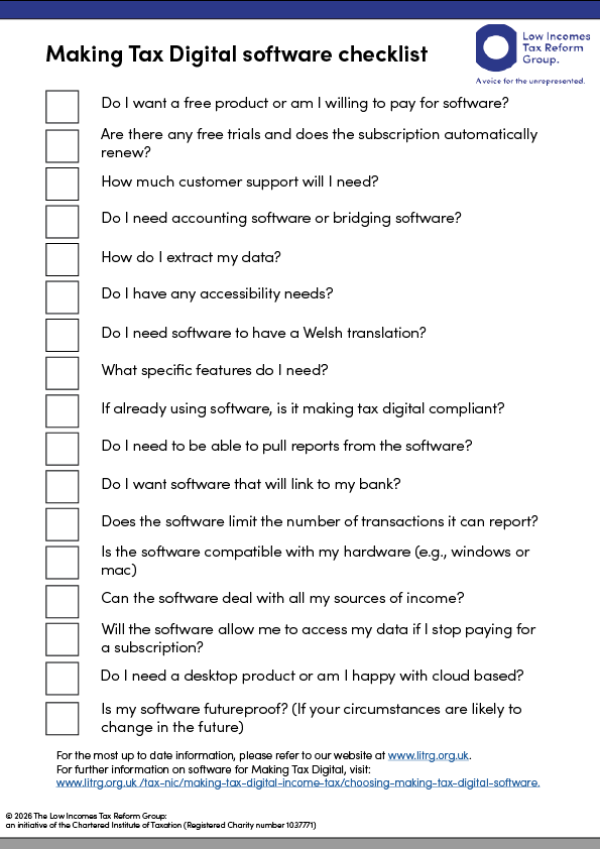
The list can then be filtered for things like accessibility features and whether the software is paid or free. It will be up to you to determine what product (or products) best suits your needs. The tool shows you both what is available now and what products are in development. You should always check the software provider’s website for full details before committing to a particular software product. Our checklist below provides examples of some of the points you may wish to consider, or questions you might want to ask, when choosing a software product.
If you are VAT registered
If you are VAT registered and are already using software that meets the requirements of Making Tax Digital for VAT, you need to consider how you will also meet the Making Tax Digital for Income Tax requirements. You could check with your current provider to see whether their software will also be suitable for Making Tax Digital for Income Tax. If not, then you may need to look around for a different product which will cover both requirements, assuming you don’t want to keep two sets of records on two different pieces of software (it is not a requirement that you have separate packages for income tax and VAT).
It is possible to change your VAT quarters to align with Making Tax Digital for Income Tax quarterly update periods, if you wish to do so for convenience, although this is not compulsory.
Changing software
You may find that you want to change your software if it no longer meets your needs or if your circumstances change. It is worth bearing in mind that the old and new software products may not be compatible if they do not store data in the same way. It could therefore be difficult to transfer data from one product to another. It may be preferable to wait until the end of a tax year, if possible, before changing software providers.
As you are required to maintain business records for at least five years from the 31 January following the end of the tax year, you will need the ability to extract your business records if you are changing software providers. You should ensure there is a way to download and store your data, for example, on an external hard drive. For some software providers, the ability to access your data may rely on paying an ongoing subscription fee.
Making Tax Digital software checklist
Making Tax Digital software checklist by LITRG. This checklist provides a list of things to think about when you are researching software for Making Tax Digital.
Making Tax Digital software checklist
Making Tax Digital software checklist by LITRG