Record keeping and quarterly updates for Making Tax Digital
Making Tax Digital for Income Tax requires affected taxpayers to keep digital records and send details of their income and expenditure to HMRC every quarter (known as a quarterly update). This page explains what digital record keeping means and explains the process for filing quarterly updates.
Content on this page:
Digital record keeping for Making Tax Digital
Making Tax Digital creates a new legal requirement for certain taxpayers with self-employment and/or rental income to maintain business records digitally and submit quarterly updates of income and expenses to HMRC. This means that a digital record-keeping system must be used by taxpayers who are in Making Tax Digital. Our page Who does Making Tax Digital apply to? explains more about who is required to join Making Tax Digital.
If you are required to follow the Making Tax Digital rules, you will either have to use specific Making Tax Digital accounting software packages, or apps, or maintain spreadsheets to record business transactions.
Many software companies are still developing products to meet all the Making Tax Digital requirements. There is a tool on GOV.UK which can help you choose software, depending on your individual requirements. You should check exactly what the product you are considering does now and what it will do in the future before deciding which product you will use.
You can find out more information about the different types of software available on our page Choosing Making Tax Digital software. It also has a checklist of things to consider when choosing software.
If you have more than one source of income for which you need to file quarterly updates (see the quarterly updates section below), you will need to keep separate digital records for each source. For example, you may have self-employment income and rental income, or two different self-employment trades. (Note, however, that you only need to submit one combined quarterly update for all UK property income, as this is treated as one rental business. Foreign property income does need to be reported separately). This might mean that you have to pay for more than one software licence within your software product or you may even need two separate software products.
If your business is VAT registered and you are already within the Making Tax Digital for VAT regime, you should check whether the software you are using is also compatible with Making Tax Digital for Income Tax. This would mean you only have to keep one set of digital records for both.
How to keep digital records for Making Tax Digital
If you do not keep your records digitally now, you need to decide how you are going to change to a digital system, and when you are going to do this, bearing in mind when you expect to be legally required to use Making Tax Digital (see our page When does Making Tax Digital start for me? for more information on this). This could depend on several factors such as:
- How experienced or confident are you when using IT/software?
- Do you have access to the internet? If so, how reliable is your broadband service?
- Do you have anyone to ask if you need any help? If so, are they already using a particular product in their own business that they can recommend to you?
- What kind of budget do you have (if any)?
- What hardware you are most comfortable using (e.g. laptop, tablet, phone etc)? Does it have the necessary system requirements to run the software?
- Is there anywhere you can get some training? (YouTube videos, chat forums, local IT support groups, local charities, etc.)
Records you must keep digitally
Under Making Tax Digital, as a minimum, you must keep details of the following information when recording self-employment or property income and expenditure:
- The amount of the income or expense
- The date when income was received or expenses were paid (assuming you are using the cash basis)
- The category of income or expenses as per the self employment and property pages of the current self assessment tax return (unless you are using consolidated expenses or simplified expenses – see our sections below for more information on these expenses).
You may wish to keep more detailed records, for example, who income was paid by or what an expense was for, but HMRC do not require this information to be included in the quarterly updates.
Penalties for inadequate records
The general rules on keeping adequate business records for tax purposes continue to apply if you are using Making Tax Digital. HMRC can charge a penalty of up to £3,000 for failing to keep adequate records. See our business record keeping guidance for more information.
Specific record-keeping requirements for retailers
HMRC have confirmed that if you are a retailer, you can choose to create a digital record of your daily gross takings, rather than a record for each individual sale. Full information about what needs to be included in your digital records if you are a retailer can be found on GOV.UK.
Submitting quarterly updates for Making Tax Digital
You will need to submit quarterly updates to HMRC to declare business and/or property income and expenses for the period covered by the update. Four quarterly updates will be required each year (as well as a final year-end tax return).
The updates should be generated by the record-keeping system if you are using bookkeeping software. If you are using bridging software then it is likely you will need to link your spreadsheets using the bridging product each time you want to submit a quarterly update.
Quarterly updates are not tax returns. They only need to include your qualifying income and associated expenditure. You do not need to include other income sources in the quarterly returns, such as PAYE income from an employment or savings income from bank accounts (although some software providers may allow you to do so). These additional sources of income do need to be included in the year-end tax return.
The periods for quarterly updates are cumulative, so updates are due for the following periods each tax year:
| Quarterly update period | Due date |
| 6 April to 5 July | 7 August |
| 6 April to 5 October | 7 November |
| 6 April to 5 January | 7 February |
| 6 April to 5 April | 7 May |
As can be seen from the above, the due date for submission of the quarterly update is the 7th day of the following month.
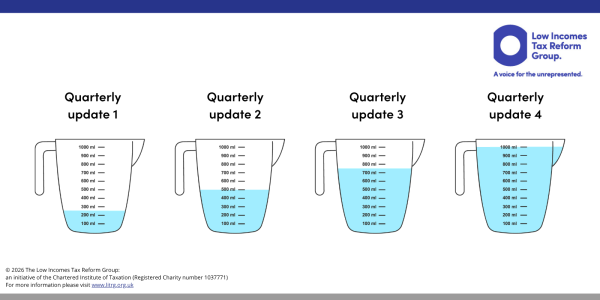
Each submission effectively supersedes the previous one. If you imagine that you are adding ingredients to a measuring jug (the ‘ingredients’ being your income and expenditure totals) – after each quarterly update, the jug gets filled up a bit more and should be full after quarterly update four:
You can choose to send your updates early if you are sure that the income and expenses included cover the whole update period. If you do not anticipate any further income or expenses for a quarter, you can send an update up to 10 days before the end of the update period. This may be the case if you are ill and not working, for example, and know that you will not receive any further income in that update period. You can also choose to submit updates more often, if for example, you wanted to see the impact on your projected tax liability of a one-off expense – most software products will allow you to send more frequent updates.
Calendar quarters election
It is possible to elect for the update periods to tie in with a month end if this is more convenient and your software allows you to do so. This is sometimes called a ‘calendar quarters’ election. You should be able to make this election within your software. If you make this election, the periods become:
| Quarterly update period | Due date |
| 1 April to 30 June | 7 August |
| 1 April to 30 September | 7 November |
| 1 April to 31 December | 7 February |
| 1 April to 31 March | 7 May |
Note that the due dates for the submissions do not change. Regardless of what dates your update period covers, your submission will always be due on 7th of the relevant month (August, November, February and May.)
The election must be made before the first quarterly update is submitted for the tax year to which you want it to apply.
Note that if you were to change from a tax year basis to calendar quarters then the first quarterly update under calendar quarters would be from 6 April to 30 June.
Once you make a calendar quarters election, it remains in place unless you decide to change back to standard update periods. If you do decide to change back, the calendar update election should be cancelled in your software before the first update of the tax year for which you want to revert back to standard update periods is submitted. If you cancel the calendar update election after this date, then you cannot move to standard quarterly update periods until the beginning of the next tax year.
Consolidated expenses (also called 3 line accounts)
If your gross income from self-employment or property is less than £90,000 in the tax year, you can choose to just enter the total amount of your expenses on your tax return, without having to break down the figure into separate expense categories. The exception to this is for residential property finance costs, typically mortgage interest, which must always be categorised separately. More information can be found on our page Making Tax Digital for landlords. This is known as consolidated expenses by HMRC. The £90,000 threshold is per each income source, not combined – if you have both self-employment income and rental income, you can use consolidated expenses for both income sources if your gross income is below £90,000 for each of them.
If you know before the start of the tax year that you will be using consolidated expenses when finalising your tax return, you can file quarterly updates with just the total amount of expenses rather than the breakdown between categories. Your software may help you do this.
If you are not sure before the start of the tax year that your gross income will be below £90,000, you should continue to allocate your expenses into the relevant categories. You may wish to categorise your expenses in this way anyway, even if you are not required to, in order to help you maintain more accurate and informative business records.
More than one source of self-employment and/or rental income
If you are within Making Tax Digital for income tax and have both property income and self-employment income or more than one self-employment, you must submit separate quarterly updates for each source. You will need to do quarterly updates of income and expenses for each self-employment and also separate quarterly updates for property income and expenses, unless you are taking advantage of one of the property income easements in relation to jointly owned property. You will also need to submit separate updates if you have foreign property income. Note that you only need to submit one combined quarterly update for all UK property income, as this is treated as one rental business.
Simplified expenses
There are some business expenses (for example motor expenses) where it is possible to claim a flat rate allowance instead of actual costs. See our business expenses guidance for more information. If you use simplified expenses, and you are sure before the start of the tax year that you will do so, you do not need to keep records of your actual expenses. You can then include your simplified expenses totals on your final year end tax return. You can find out more information about the year end process on our page End of year tax returns under Making Tax Digital.
Correcting a mistake in your digital records
If you realise you have made a mistake in your digital records, for example you have forgotten to include an expense you should correct the digital records as soon as the mistake is spotted. The next time you file a quarterly update this will automatically take account of the amended records, provided it is within the same tax year, so up to and including the quarter 4 update. The fact that the updates are cumulative means this is the case.
However if the mistake in the digital records is in quarter 4, then either the fourth quarterly update must be re-submitted after the amendment to the digital records has been made, or it is corrected as part of the end of year adjustments when the annual tax return is completed.
Estimated tax calculations
After each quarterly update is submitted to HMRC, an estimated calculation of your tax bill will be available, based on the information included in the quarterly updates. As these figures may not have been adjusted for tax purposes (for example, if any private use adjustments are required), the tax calculation may not be accurate. They may also not take into account any other sources of taxable income. Therefore these calculations should not be relied on unless you have very straightforward tax affairs.